
TL;DR: I wanted to try FPV before spending real money on a drone radio. I had ESP32 boards and joysticks already lying around from IoT projects, so I built a USB sim controller instead. It works well enough to learn in Liftoff — but cheap potentiometer sticks are the weak link. Tiny movements don’t register the way a hall-effect gimbal would.
⚡ Firmware and build notes: krVishesh/drone-rc
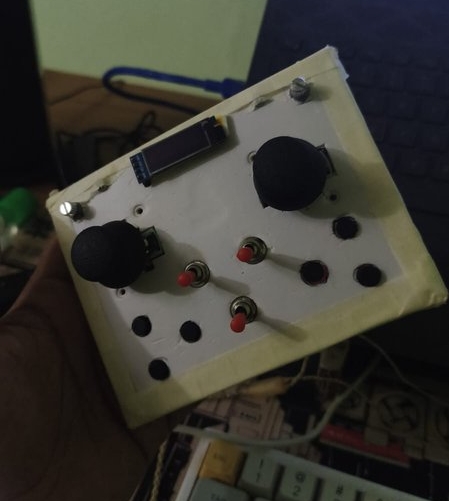
Table of Contents
- Why not just buy a radio?
- Parts I already had
- What I actually built
- Does it do the job?
- The joystick problem
- What’s next
- Useful links
Why not just buy a radio?
FPV looked fun. Also expensive. A decent radio, a quad, batteries, goggles, spare props, the inevitable “I crashed again” fund — that’s a lot of money to spend before you know whether you’ll actually enjoy the hobby or just rage-quit after the tenth tree strike.
I didn’t want to dive headfirst into that hole. I wanted to learn first: stick feel, throttle control, the muscle memory of coordinated turns, all without a real aircraft waiting to meet a branch.
Simulators solve half of that. Liftoff, Velocidrone, Uncrashed, DRL — they all want a controller. What they don’t care about is whether that controller cost ₹15,000 or came out of a parts bin with too much hot glue.
So instead of putting money down on a proper drone radio, I asked a simpler question: can I build something good enough to find out if I even like this?
Parts I already had
I’ve been doing IoT stuff for a while — ESP32 boards, joysticks, OLED screens, buttons, the usual “I’ll use this in a project someday” pile. Someday showed up.
| What | Why it was already there |
|---|---|
| Waveshare ESP32-S3-Zero | Tiny board, native USB — perfect for a HID device |
| Analog joysticks | Left over from an earlier ESP-NOW RC controller build |
| SSD1306 OLED | Because every project needs a tiny screen |
| Rotary encoders, toggles, buttons | Spares from other prototypes |
The earlier ESP-NOW box was a wireless toy for controlling robots — fun, but useless for a sim that expects a USB gamepad. This time the goal was simpler: plug in USB, open a sim, fly.
And yes, it’s another recruit for the HID device army that started with a split keyboard and a hi-res scroll dial. At this point my desk looks like a customs checkpoint for input devices.
What I actually built
A handheld remote that looks like a radio but isn’t one. No ELRS, no CRSF, no RF at all — just USB. Plug it into a laptop, and the sim sees a gamepad called Drone RC Sim.
Two sticks (Mode 2: left = yaw/throttle, right = roll/pitch), a couple of toggles, six buttons, two rotary encoders for trim, a small OLED showing live stick values, and an RGB LED so I know USB is alive. The firmware runs on ESP-IDF and reports stick positions at 1000 Hz — fast enough that the sim feels responsive.
The enclosure is… honest. White faceplate, masking tape on the edges, screws in the corners, components held down with hot glue. It won’t win a design award. It enumerates and flies.
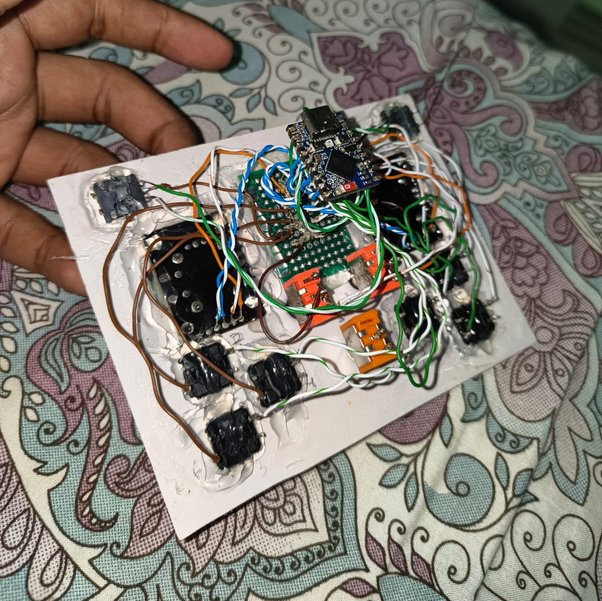
Underneath is the real story: an ESP32-S3-Zero at the top, two joystick modules, ethernet-cable wire salvaged for connections, and enough hot glue to survive a small earthquake. Looks like it shouldn’t work. Does anyway.
Stick calibration is built in — sweep both sticks, save to flash. The encoders adjust subtrim so you can dial in a hover point without re-calibrating everything. Small quality-of-life things that make sim practice less annoying.
Does it do the job?
For the question I actually cared about — “do I want to keep learning this?” — yes.
I’ve spent hours in simulators practicing takeoffs, turns, and the kind of controlled panic that happens when you realize you’re about to hit a virtual wall. The remote is good enough to build habits: throttle management, yaw coordination, not punching the sticks like I’m playing a fighting game.
It’s not a RadioMaster. It doesn’t need to be. It’s a cheap experiment that answers a question before I open my wallet for the real thing.
If you’re curious about the technical side — pin map, HID report layout, how trim is stored — the GitHub repo has all of that. This post is about the why, not the descriptor bytes.
The joystick problem
Here’s the honest limitation, and it’s the biggest one.
These are cheap potentiometer joysticks — the kind with a little wiper sliding over a carbon track. They work. They’re also the wrong tool for FPV.
Tiny stick movements — the kind you need for smooth hovering and fine corrections — often don’t register cleanly. There’s mechanical slack near center, the ADC reading jumps in small steps, and you feel it immediately in the sim: the quad either sits still or overreacts. No buttery micro-adjustments. No hall-effect smoothness.
Real FPV radios use hall-effect gimbals for a reason. No physical contact, no wear, and critically — much better resolution around center where you spend most of your time learning.
I knew this going in. These were parts I already owned, not parts I chose for performance. For “do I like flying drones at all?” they’re fine. For “can I train like I have pro gear?” they’re not.
If I keep going with FPV after sim practice, hall-effect sticks (or just buying a proper radio) is the obvious upgrade. The rest of the build — USB, firmware, buttons, trim — I’d keep. The joysticks are the bottleneck, not the ESP32.
What’s next
Two paths, and I haven’t picked yet:
- Keep simming on this box until basic stick control feels natural, then decide if real FPV is worth the investment.
- Swap the gimbals for hall-effect modules and see how much of the “sloppy center” problem disappears before spending on a full radio.
Either way, building this first was the right call. I learned ESP-IDF USB HID, got flight time in sim, and didn’t buy a ₹10k+ radio for a hobby I might have bounced off of in a week.
If you’re in the same spot — curious about FPV, not ready to commit cash — a sim controller from parts you already have is a reasonable first step. Just don’t expect potentiometer sticks to feel like the real thing. They won’t.
Useful links
- drone-rc — GitHub
- Space Scroll: A Wireless Hi-Res Scroll Dial
- Multi-Device RC Controller with ESP-NOW
- 42_wings split keyboard
Build cheap, crash in software, and find out if you actually like flying before the real money goes out the door. The sticks will tell you when it’s time to upgrade.