
Ever spin a mouse wheel and think, “This is fine… but what if it felt like a dial?” That’s the rabbit hole I fell into — right after I finished hand-wiring my own split keyboard and apparently decided one custom HID device wasn’t enough. At this rate I’m assembling a personal HID device army: typed on with the left flank, scrolled with the right. Logitech who? 😅
The goal: a wireless scroll dial with the silky, fine-grained feel of a hi-res trackpad wheel — not the chunky click-click of a basic BLE mouse. Spoiler: it works, but only after I taught ESP-IDF’s NimBLE stack that mouse feature reports are a thing.
Table of Contents
- Motivation & The Engineer Bo Rabbit Hole
- Hardware: ESP32-C6, AS5600, and Friends
- Reading the Dial: AS5600 & Scroll Math
- BLE HID: Why Hi-Res Isn’t Just “Send Bigger Numbers”
- The HID Descriptor: Resolution Multiplier (0x48)
- Patching ESP-IDF esp_hid: The Feature Report Gotcha
- Firmware Architecture
- Debugging: Crashes, evtest, and Re-Pairing
- Tuning Sensitivity
- What’s Next?
- Useful Links & Resources
- Bill of Materials (BOM)
Motivation & The Engineer Bo Rabbit Hole
I wanted a desk gadget that scrolls like the Logitech MX Master thumb wheel — smooth, analog, infinite — but built from parts I actually own. Commercial “space mice” exist, but where’s the fun in buying one?
Then I found Engineer Bo’s Full Scroll Dial — an nRF52840 + AS5600 build that uses the HID Resolution Multiplier to get true hi-res scrolling on Windows and Linux. The key insight: hosts don’t just want bigger wheel values. They want a negotiated multiplier (120 units = 1 legacy scroll line) via a feature report, exactly as Microsoft’s wheel HID spec describes.
My mission: replicate that on ESP32-C6 with ESP-IDF v6 and NimBLE. How hard could it be?
(Narrator: it was harder than expected.)
My Growing HID Device Army
This isn’t my first rodeo with “why buy it when you can solder it?” Last year I documented building a custom split keyboard from Ergogen to QMK — cardboard plates, diode orientation trauma, TRRS half-duplex debugging, the works. That keyboard handles input. Space Scroll handles scroll. Together they are dangerously close to a full desk takeover.
| Device | Job | Transport | Status |
|---|---|---|---|
| 42_wings split keyboard | Type all the things | USB (QMK) | ✅ Deployed |
| Space Scroll dial | Silky hi-res scroll | BLE HID | ✅ Deployed |
| Macro pad (incoming) | Layers, shortcuts, and the OLEDs | TBD | 👀 Incoming |
I’m not building peripherals anymore — I’m recruiting them. My laptop’s Bluetooth pairing screen looks like a war room. Host OS: “How many HID devices do you need?” Me: “Yes.”
If you survived the split keyboard build log, the scroll dial is the same energy: read the spec, patch the stack, stare at evtest until joy appears.
Hardware: ESP32-C6, AS5600, and Friends
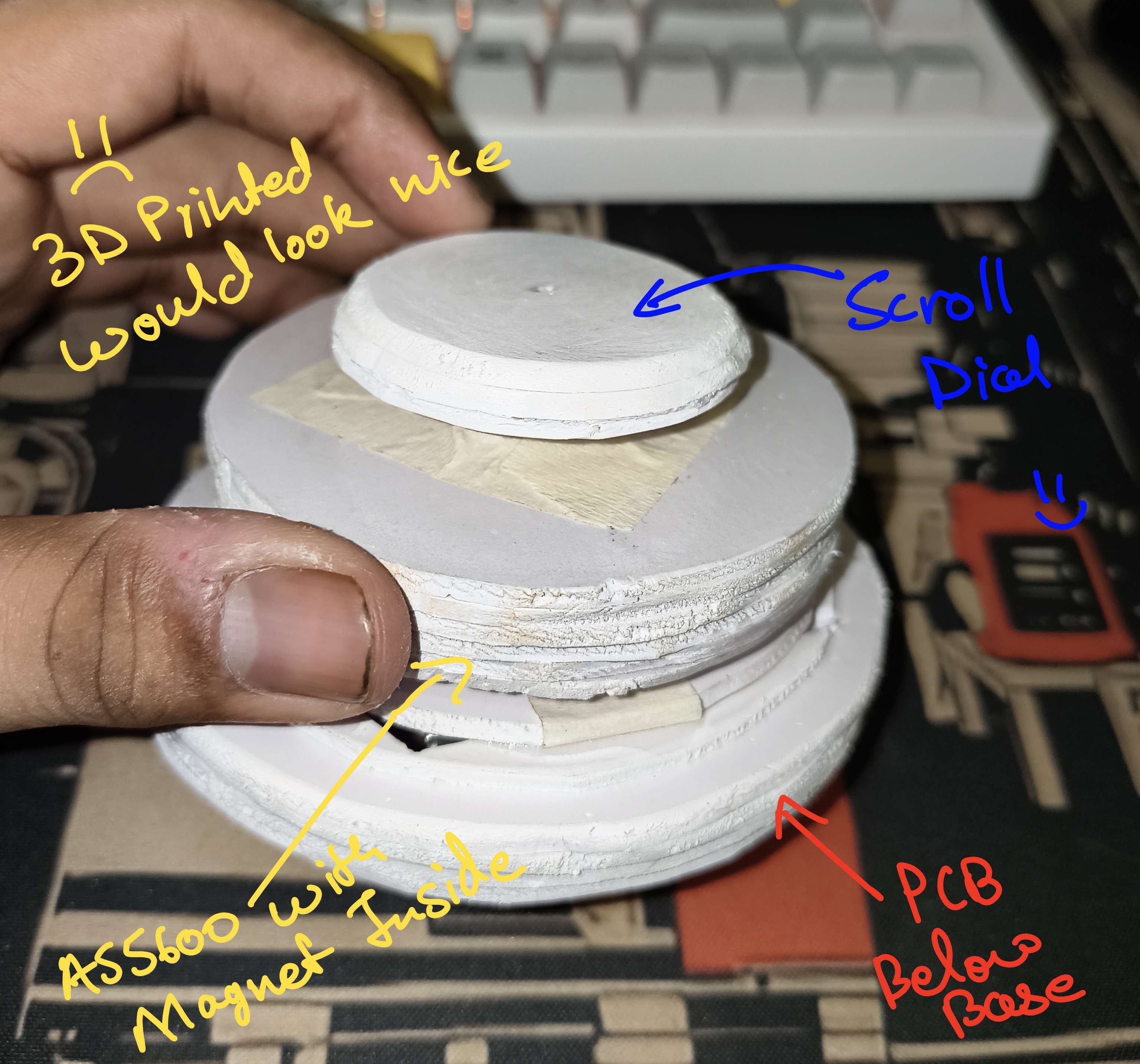
The build centers on an ESP32-C6 dev board (BLE 5, low power, plenty of GPIO) and an AS5600 12-bit magnetic rotary encoder over I2C. A diametrically magnetized disc on the dial shaft gives absolute angle; firmware tracks deltas and maps them to scroll units.
| Function | GPIO |
|---|---|
| AS5600 SCL | 19 |
| AS5600 SDA | 20 |
| WS2812 status LED | 8 |
| Battery divider (ADC) | 5 |
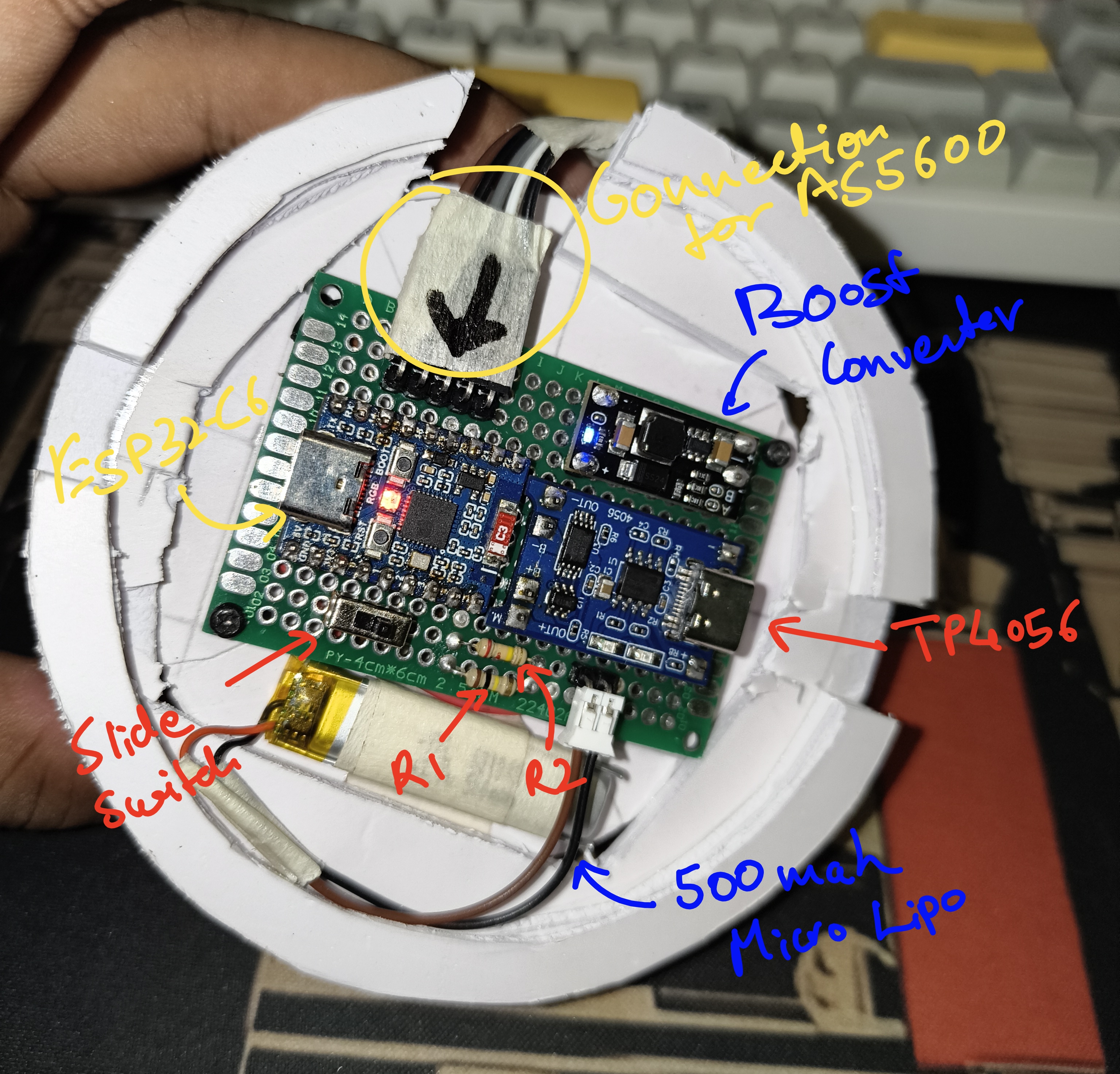
Power: LiPo with a resistor divider (R1=100K to Li+, R2=220K to GND) for rough state-of-charge. Below ~3.35 V under load, the WS2812 goes red — your cue to charge before the dial dies mid-scroll.
Status LED colors:
- Blue pulse — advertising, waiting for a host
- Green — connected over BLE
- Red — low battery
Everything is wired on a hand-soldered DIY PCB — ESP32-C6, AS5600, WS2812, LiPo connector, and the resistor divider all on one board. No fancy fab house yet; just copper, flux, and stubborn optimism.
Reading the Dial: AS5600 & Scroll Math
The AS5600 reports a 0–4095 count per revolution. Because it’s absolute, firmware must unwrap deltas across the 0/4095 boundary — otherwise a slow turn near wrap-around looks like a wild spin.
static int unwrap_encoder_delta(int prev_count, int count)
{
    constexpr int half_rev = espp::As5600::COUNTS_PER_REVOLUTION / 2;
    int diff = count - prev_count;
    if (diff > half_rev) {
        diff -= espp::As5600::COUNTS_PER_REVOLUTION;
    } else if (diff < -half_rev) {
        diff += espp::As5600::COUNTS_PER_REVOLUTION;
    }
    return diff;
}
Each sample converts encoder counts to degrees, then accumulates scroll units:
- Hi-res mode:
units = delta_deg × (120 / BOARD_SCROLL_DEG_PER_LINE) - Legacy fallback:
lines = delta_deg / BOARD_SCROLL_DEG_PER_LINE
With BOARD_SCROLL_DEG_PER_LINE = 12, you get 10 hi-res units per degree and 120 units per full legacy line — matching the HID physical maximum.
The dial task runs every 5 ms, accumulates fractional scroll in a float buffer, and only sends a HID report when at least 1 unit is ready. Clockwise dial rotation maps to scroll down (negative wheel on Linux).
BLE HID: Why Hi-Res Isn’t Just “Send Bigger Numbers”
A naive approach: advertise as a BLE mouse and send wheel values of ±120. Linux will dutifully emit both REL_WHEEL=±1 and REL_WHEEL_HI_RES=±120 on every event. That feels broken — huge jumps, not smooth scrolling.
Working hi-res looks like this in evtest:
Event: time 12345.678, type 2 (EV_REL), code 11 (REL_WHEEL_HI_RES), value 3
Event: time 12345.679, type 2 (EV_REL), code 11 (REL_WHEEL_HI_RES), value -1
Event: time 12345.680, type 2 (EV_REL), code 11 (REL_WHEEL_HI_RES), value 6
Small, varying REL_WHEEL_HI_RES values. REL_WHEEL (code 8) stays at 0 most of the time — it only ticks ±1 when accumulated hi-res crosses 120.
The host negotiates this via the Resolution Multiplier feature report. Until that’s set up, you’re stuck in legacy land.
The HID Descriptor: Resolution Multiplier (0x48)
The report map follows the pattern from ESP32-BLE-Mouse #78 and Engineer Bo’s nRF build:
- Input report ID 1:
[X, Y, Wheel]— 3 bytes, relative - Feature report ID 1: Resolution Multiplier (
usage 0x48), logical 0–1, physical 1–120
/* Excerpt from dial_ble.c — feature report is the magic sauce */
0x09, 0x48,       /*       Usage (Resolution Multiplier) */
0x15, 0x00,       /*       Logical Minimum (0) */
0x25, 0x01,       /*       Logical Maximum (1) */
0x35, 0x01,       /*       Physical Minimum (1) */
0x46, 0x78, 0x00, /*       Physical Maximum (120) */
0x75, 0x08,       /*       Report Size (8) */
0x95, 0x01,       /*       Report Count (1) */
0xB1, 0x02,       /*       Feature (Data,Var,Abs) */
On connect, Linux sends a SET_REPORT to enable the multiplier. The device advertises as SpaceScroll (vendor 0x16C0, product 0x05E0) so re-pairing forces the host to reload the descriptor.
Re-pair after every descriptor change. Bluetooth hosts cache HID report maps aggressively. Flash new firmware → remove the old pairing → pair fresh. Trust me on this one.
Patching ESP-IDF esp_hid: The Feature Report Gotcha
Here’s where the project stopped being a weekend hack and became a firmware archaeology expedition.
Stock ESP-IDF’s esp_hid_common.c registers input reports for mice, but silently drops feature reports. No feature GATT characteristic → Linux can’t negotiate hi-res → calling esp_hidd_dev_feature_set() crashes with assert(p_rpt != NULL) in nimble_hidd.c.
The fix lives in a local component override at components/esp_hid/:
/* esp_hid_common.c — mouse branch now registers FEATURE reports */
if (report->feature_len > 0) {
    esp_hid_report_item_t item = {
        .usage = ESP_HID_USAGE_MOUSE,
        .report_id = report->report_id,
        .report_type = ESP_HID_REPORT_TYPE_FEATURE,
        .protocol_mode = ESP_HID_PROTOCOL_MODE_REPORT,
        .value_len = report->feature_len / 8,
    };
    if (add_report(map, &item) != 0) {
        return -1;
    }
}
Critical build note: CMake only picks up the local override after a full clean:
idf.py fullclean build
Incremental builds keep using the IDF copy in ~/.espressif/... and you’ll wonder why hi-res never works. At boot, the firmware logs parsed reports — you want to see both INPUT and FEATURE for report ID 1.
We also removed the firmware-initiated esp_hidd_dev_feature_set() call. Linux SET_REPORTs the multiplier on its own during HID probe; trying to set it from firmware before the GATT char exists was the crash source. Instead, a delayed task marks hi-res active 500 ms after connect:
static void hi_res_enable_task(void *param)
{
    vTaskDelay(pdMS_TO_TICKS(BOARD_HID_HI_RES_ENABLE_MS));
    /* ... */
    s_hi_res_active = true;
    APP_LOGI("HID hi-res scroll active (multiplier=%d)", DIAL_BLE_SCROLL_HI_RES);
}
Feature report changes from the host still arrive via ESP_HIDD_FEATURE_EVENT if you need to log them.
Firmware Architecture
app_main
 ├── status_led_init()      WS2812: advertising / connected / low batt
 ├── battery_init()         ADC on GPIO5, divider math
 ├── dial_ble_init()        NimBLE HID, report map, GAP advertising
 ├── init_encoder()         AS5600 over I2C (espp component)
 ├── dial_ble_start()       NimBLE host task
 └── dial_task              5 ms loop: read encoder → accumulate → send scroll
Dependencies (via main/idf_component.yml):
espp/as5600— magnetic encoder driverespp/i2c— I2C helperespressif/led_strip— WS2812
Build targets:
idf.py set-target esp32c6
idf.py build flash monitor          # debug logging
idf.py -DSDKCONFIG_DEFAULTS="sdkconfig.defaults;sdkconfig.defaults.release" build  # release
Want to see the code, patched esp_hid component, and board config? Check out the Space Scroll repo on GitHub.
Debugging: Crashes, evtest, and Re-Pairing
The crash
Connect → 500 ms later → reboot. Root cause: esp_hidd_dev_feature_set() asserting because no feature report was registered. Fix: patch esp_hid + don’t call feature_set from firmware.
Verifying on Linux
sudo evtest
# Select SpaceScroll, rotate slowly
| Pattern | Meaning |
|---|---|
REL_WHEEL_HI_RES = ±1, ±3, ±6… varying | ✅ Hi-res working |
REL_WHEEL = 0 most of the time | ✅ Normal |
Every event: REL_WHEEL=±1 and REL_WHEEL_HI_RES=±120 | ❌ Multiplier not negotiated — re-pair, check serial log |
Re-pairing
bluetoothctl
# remove XX:XX:XX:XX:XX:XX
# scan on
# pair / trust / connect SpaceScroll
Confirm descriptor on the host
for d in /sys/bus/hid/devices/*; do
  grep -q SpaceScroll "$d/uevent" 2>/dev/null || continue
  xxd "$d/report_descriptor"
done
Look for usage 0x48 (Resolution Multiplier) in the output.
Optional udev hwdb
If scroll still feels off on some setups:
# /etc/udev/hwdb.d/11-spacescroll-mouse.hwdb
mouse:*:name:SpaceScroll:
 MOUSE_WHEEL_CLICK_ANGLE=7.5
 MOUSE_WHEEL_CLICK_COUNT=120
Then sudo systemd-hwdb update && sudo udevadm trigger.
Tuning Sensitivity
All in main/board_config.h:
| Define | Default | Effect |
|---|---|---|
BOARD_SCROLL_DEG_PER_LINE | 12.0 | Degrees of dial rotation per one legacy scroll line. Higher = slower. |
BOARD_HID_HI_RES_ENABLE_MS | 500 | Delay after BLE connect before enabling hi-res mode. |
BOARD_DIAL_REPORT_MS | 5 | Encoder poll interval (ms). |
DIAL_BLE_SCROLL_HI_RES is fixed at 120 per the HID spec — that’s the physical maximum in the descriptor.
Want snappier scrolling? Lower BOARD_SCROLL_DEG_PER_LINE. Want more precision? Raise it.
What’s Next?
The HID device army marches on:
- 3D-printed enclosure with weighted dial feel
- Sleep modes for battery life
- A macro pad to complete the trifecta (keyboard + dial + pad = full desk sovereignty) — with the OLED screens the split keyboard never got. Fair’s fair: the pad gets the fancy display.
Previously in the army: Custom Split Keyboard: From Ergogen to QMK — hand-cut cardboard, QMK firmware, and enough soldering to void several warranties.
Useful Links & Resources
- Space Scroll — GitHub
- 42_wings split keyboard — GitHub
- Engineer Bo — Full Scroll Dial (YouTube)
- ESP32-BLE-Mouse hi-res discussion #78
- Microsoft Mouse HID design guidelines
- AS5600 datasheet (AMS)
- ESP-IDF NimBLE HID docs
- espp AS5600 component
- Space Scroll firmware (GitHub)
Bill of Materials (BOM)
| Item | Notes | Approx. Cost (INR) |
|---|---|---|
| ESP32-C6 dev board | BLE 5, USB-C | ₹400–600 |
| AS5600 breakout | I2C magnetic encoder | ₹150–250 |
| LiPo battery | 3.7 V, 500–1000 mAh | ₹150–300 |
| Resistors 100K + 220K | Battery voltage divider | ₹10 |
| Perfboard / PCB | Custom layout TBD | ₹50–500 |
Note: Prices are approximate and may vary. No affiliate links — yet.
Building a hi-res BLE scroll dial is equal parts HID spec reading, ESP-IDF spelunking, and
evteststaring. Pair it with a hand-wired split keyboard and your desk becomes a custom HID device army — one peripheral at a time. If you want scroll that actually feels smooth on Linux, the Resolution Multiplier feature report isn’t optional — and neither isidf.py fullclean. Happy scrolling! 🌀 ⌨️